Refining your content outline is essential for producing outstanding content that ranks highly and meets user expectations. WordCrafter’s AI-generated outlines are powerful starting points—but remember, they're just the beginning. To truly create exceptional content, you’ll need to apply your expertise, insights, and strategic thinking alongside our specialized outline refinement tools.
In this guide, we’ll explore how to effectively leverage these tools to maximize your content’s potential and ensure your outline is detailed, competitive, and engaging.
Understanding Your AI-Generated Outline
WordCrafter constructs the suggested outlines by analyzing the top-ranking content on Google for your target keyword. The AI identifies recurring themes, critical topics, preferred content length, and effective structural patterns.
However, this outline is only the foundation. It’s designed to help you quickly move from a blank page to a meaningful, strong structure, allowing you to focus on refinement and strategic improvements.
Your Expertise Matters
No AI can replace your domain-specific knowledge and nuanced understanding of your audience. Here’s how you can leverage your expertise to refine the suggested outline:
Highlight Unique Insights: Identify sections where you can offer deeper insights or detailed explanations beyond basic competitor coverage.
Address Searcher Pain Points: Think about the questions, challenges, and interests of people searching for your target keyword, and ensure your outline addresses these directly.
Adjust Language and Tone: Tailor the language, terminology, and examples in your outline to align precisely with the preferences and expectations of the searcher.
To complement your expertise, WordCrafter provides several powerful refinement tools explicitly designed to improve your outline:

Let’s explore each in-depth with practical tips and best practices.
Quick Suggestions
The Quick Suggestions tab is designed to display low-hanging fruit opportunities for refining your outline:

It highlights crucial topics you might have missed, opportunities to differentiate your content, and areas where your outline might be misaligned with current search results.
Missing Critical Topic
This feature identifies important topics present on competitor pages that are absent from your outline:

Best Practices:
Review these suggestions to ensure you’re not overlooking essential elements that affect your content’s ranking potential.
Prioritize integrating critical topics into your outline, either by creating new sections or enhancing existing ones.
Use your expertise to add unique insights into these missing topics to surpass competitor coverage.
Top Content Gap
Highlights a topic not covered by top-ranking pages, presenting unique opportunities to differentiate your content:

Best Practices:
Evaluate this gap carefully to ensure relevance to your audience and alignment with search intent. If you think it adds value to the searcher, add it to your outline.
Make sure to check out the rest of the content gaps, as you can leverage them strategically to establish your content as a unique and authoritative resource.
Uncommon Topic
Identifies topics in your outline that aren’t that frequent in top-ranking competitor pages:

Best Practices:
Carefully assess uncommon topics to confirm their relevance and potential value.
Consider removing or merging topics that don't significantly add value for users searching your target keyword.
Content Gaps
This feature uncovers topics competitors have overlooked, helping you identify areas for potential leadership:

Best Practices:
Regularly use this feature to stay ahead of the competition and discover high-value opportunities.
Review each content gap to determine if it significantly adds value for users searching your target keyword. If so, include it in your outline.
Integrate these content gaps into your outline to demonstrate thought leadership, uniqueness, and comprehensive coverage.
Competitor Outlines
This feature gives visibility into competitor content structures and key topics:

Best Practices:
Examine competitor outlines closely to understand what resonates with people searching for your target keyword.
Review competitor outlines to identify critical topics you might have missed in your own outline. If a competitor covers a significant topic that you haven't addressed yet, consider including it in your outline.
Use competitor outlines as inspiration to spark new ideas. Often, reviewing what others have covered helps you discover fresh perspectives or additional value you can offer, setting your content apart.
Length Recommendations
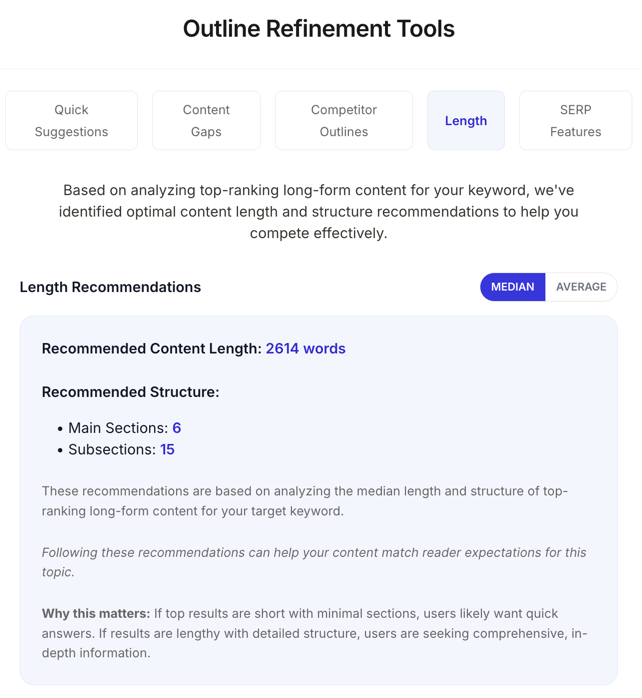
WordCrafter analyzes content length and structure from top-ranking results, guiding your outline adjustments:
Best Practices:
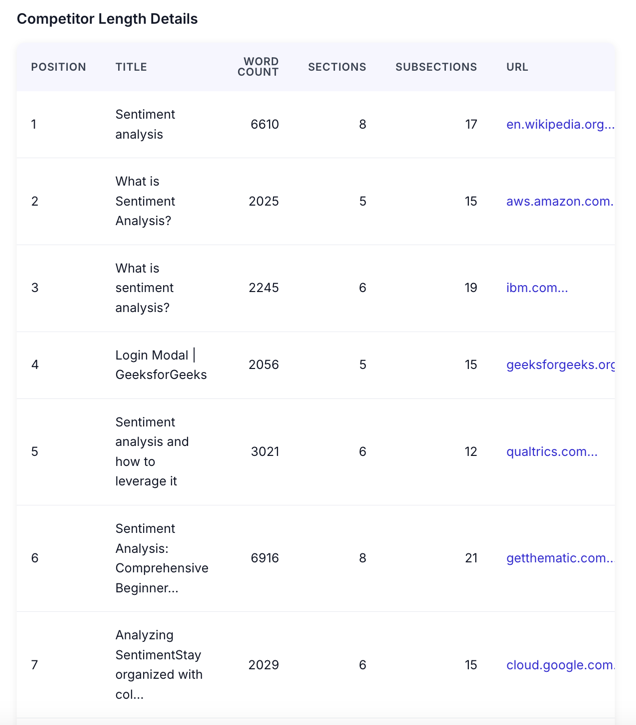
Check if most top-ranking results are notably long, indicating users expect comprehensive, in-depth content. Conversely, if results are short, it likely means users prefer quick, concise content. Adjust your outline length accordingly.
Examine not only word count but also the median number of sections and subsections. A complex structure with many sections and subsections signals that users prefer detailed, well-structured information. Conversely, a simpler structure suggests users are looking for straightforward content. Align your outline structure based on this insight.
Pay attention to outliers: If most results are of a certain length but one or two competitors are significantly shorter or longer, consider that some users searching for this keyword may prefer this alternative length. Factor these insights into your outline for a balanced approach.
SERP Features
On this tab, you can see the features from Google’s SERP, revealing direct user expectations and questions:

Best Practice:
Consider integrating questions from the "People Also Ask" into your outline, creating dedicated sections or subsections to directly answer these queries.
Utilize "Related Searches" to identify related topics that users often associate with your target keyword, and consider incorporating these insights into your outline.
Examine all of the SERP features to keep your outline aligned with current user expectations and emerging trends, ensuring your content remains highly relevant.
Recommended Refinement Workflow
For optimal results, follow this workflow:
Initial Review: Quickly review your AI-generated outline, applying your unique expertise to identify obvious improvements.
Quick Suggestions: Use this feature to ensure your content is aligned with user expectations.
Content Gap Analysis: Continuously integrate new insights that differentiate your content.
Competitor Analysis: Benchmark your outline against competitor structures to uncover potential gaps and spark new ideas.
Length: Refine your outline based on recommended lengths and structures.
SERP Integration: Update your outline to address questions and topics highlighted by SERP features.
Final Thoughts
Refining your content outline with WordCrafter combines the power of AI-driven SERP insights with your invaluable expertise. By engaging with the refinement tools provided, you’ll produce outlines that are authoritative, strategically differentiated, and optimized for performance.
Remember, the AI-generated outline is just the beginning. The time you invest in refining it will significantly improve the effectiveness of your content, positioning you strongly for success in both user engagement and search rankings.