
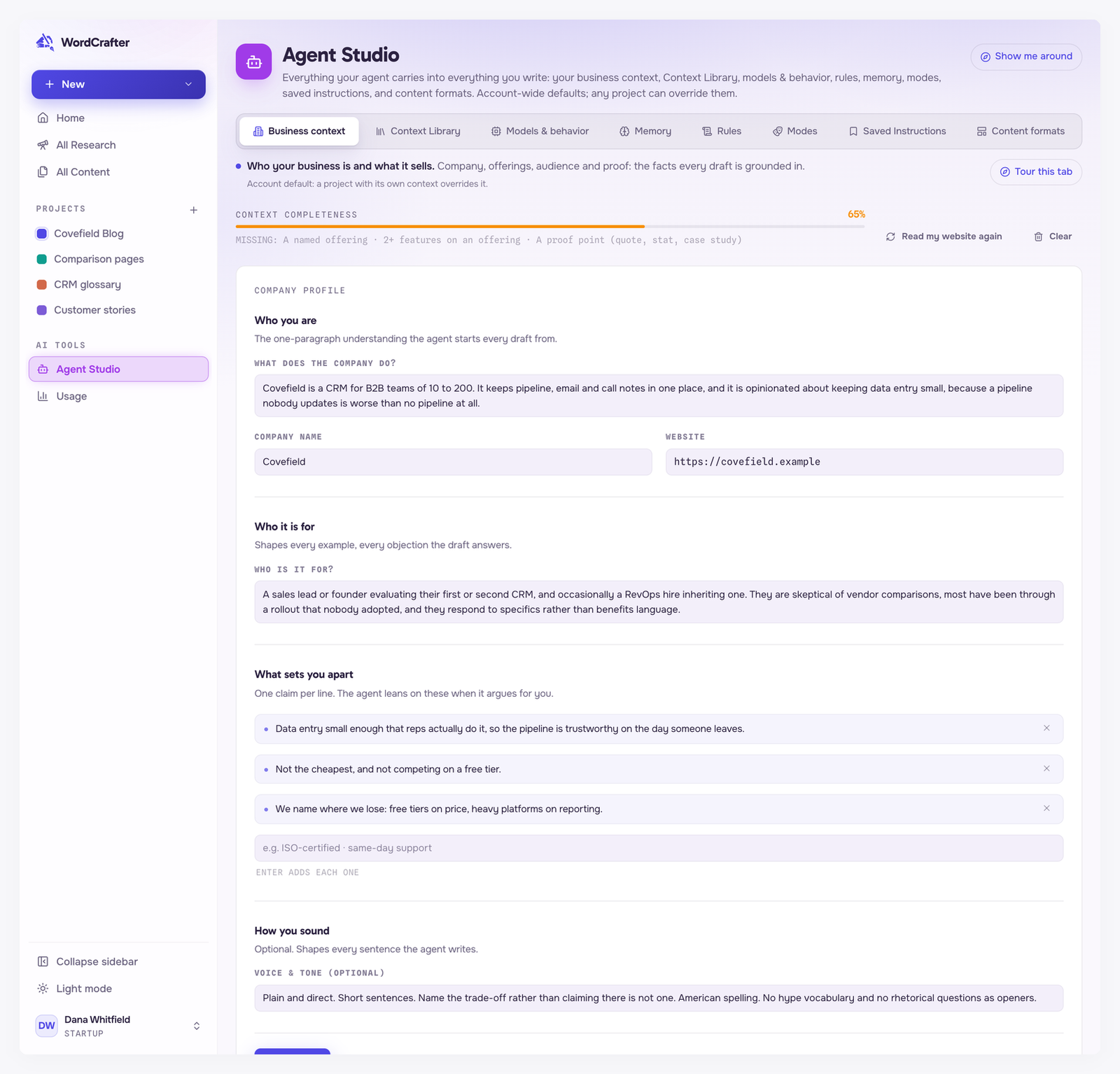
Business context is what the agent knows about your company: what you do, what you sell, who buys it and what proves it works. Commercial pages are written from these facts, and product claims come from here rather than from the model's imagination.
You will find it under Agent Studio → Business context. The one there is your account default. A project can have its own on its Agent Studio tab, and a project with its own context uses it instead of the account one.
Fill it from your website
The quickest start is to let WordCrafter read your website:
Paste the URL of a page of your website that describes your business, such as your About page.
To read more than one page, click + add another URL. You can add up to three.
Click Read my website.
WordCrafter reads the pages and drafts your profile, offerings and proof. Nothing is saved until you look at the drafted context. Click Looks right, save to save it as it is, or Edit first to change it in the form and then click Save context.
If WordCrafter read your website when you signed up, a band marked Drafted from your website sits above your context. Click Looks right, confirm to keep the drafted context, or edit anything below it.
No website to read yet? Click or fill it in manually instead.
Later, Read my website again reads your website again. It only adds: new offerings and proof are merged in, and nothing you already saved is overwritten without your review.
What goes in it
Company profile
What does the company do? One plain sentence about who you are and what you sell is enough. This is the only required field.
Company name and Website.
Who is it for? The buyer, in their own terms: their role, company size and the problem they bring.
What sets you apart. Press Enter after each one to add it as a separate point.
Voice & tone (optional). How your pages should sound.
Click Save profile when you change these fields.
Offerings
An offering is a product or service a page can sell. Click Add offering and give it a name, an optional one-line summary and its features. Add at least two features: an offering with fewer cannot anchor a commercial page.
A commercial page can sell up to three of your offerings. Deleting an offering removes it from every page that picked it, along with the sections planned for it that are not written yet. See When a commercial page asks for your business context.
Proof
Proof is the evidence a page may cite. Pick a type (Testimonial, Stat, Case study or Logo), paste the line exactly as it should appear, and add an attribution if it has one.
Quotes, stats and case studies saved here are the only proof the writer may cite. Add the ones you want your pages to use.
The completeness meter
Context completeness scores how much the agent has to work with, and lists what is still missing underneath. Each part is worth a share of the 100%:
What counts | Share |
|---|---|
What the company does | 20% |
A named offering | 15% |
Who it serves | 15% |
2+ features on an offering | 10% |
What sets you apart | 10% |
Voice & tone notes | 10% |
A proof point (quote, stat, case study) | 10% |
Company name | 5% |
Website | 5% |
The bar stays amber until your context has the minimum a commercial page needs, and turns green at 100%.
What a commercial page needs
AI will not write a product, service or landing page until three things are true: your context says what the company does, it has at least one offering with a name and two or more features, and the page has picked what it sells: one to three offerings, each with two or more features. Until then, a setup dialog asks for what is missing when you open that draft, and the AI tabs wait. When a commercial page asks for your business context walks through it.
A page uses the most specific context available: its project's if the project has one, otherwise your account's.
Business context in articles
Blog posts and articles can draw on your business context too. You choose how much, with one of four levels:
Off. Your business stays out of articles unless you ask for it in the chat.
Voice only. Your voice and audience shape the writing. The business is never named.
Subtle. Your voice, plus your business only where it clearly helps the reader, often not at all. Only your facts.
Promotional. Your business runs through the article, with one closing call to action.
Subtle is the default until you pick a level. Set it in Agent Studio → Content formats → Long-form article, under Business context in articles. That is your account default. A project can set its own level on its Agent Studio tab.
At every level, anything the agent says about your business comes from your business context, never invented. A request in the chat changes the level for one draft: ask for a mention and you get one, even on Off. Commercial pages always use your full context, whatever the level.
Clearing it
Clear deletes the whole business context, including its offerings and proof, and pages that picked those offerings lose their picks. It asks you to confirm first, and it cannot be undone.