
The SEO Optimization view checks your draft against the keyword you want it to rank for, and updates as you write. Open it from the menu at the top of the editor sidebar.
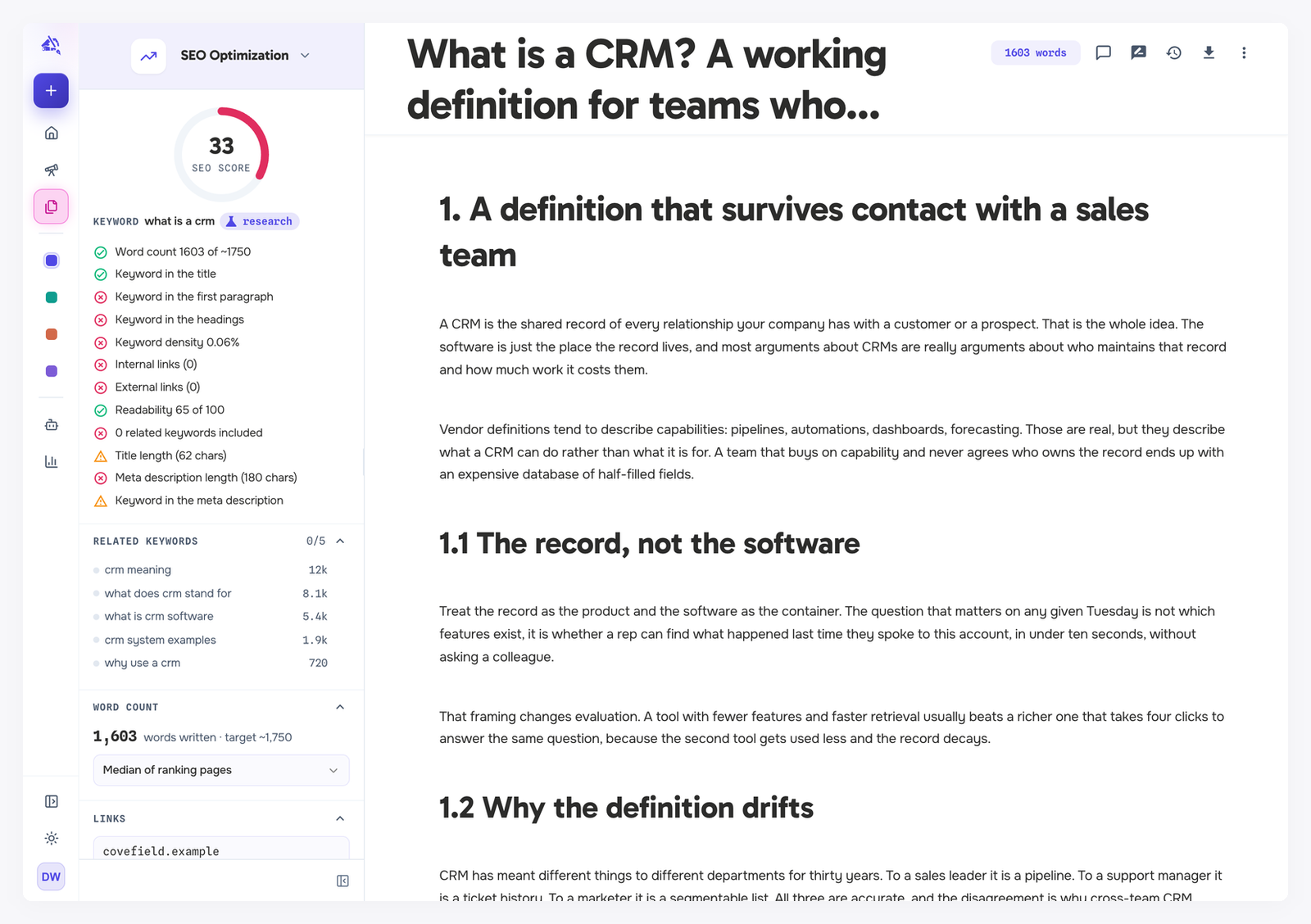
The keyword
When the draft has research attached, the research's keyword drives every check, marked with a research tag. Related keywords and the word count target come from that research too.
Without attached research, type a Target keyword yourself. The checks run against it, but related keywords and length targets from the search results need attached research. See The editor, the complete guide for attaching it.
The score
The score runs from 0 to 100. Each check that applies counts fully when it is green, half when it is yellow, and not at all when it is red, and the score is the average. Checks that do not apply yet are left out. The dial turns green from 80 and amber from 50.
Hover any check to see exactly what it looks for.
The checks
Check | Green when |
|---|---|
Word count | Between 90% and 120% of the target. |
Keyword in the title | The keyword appears exactly. Yellow if all its words are there but not together. |
Keyword in the first paragraph | It is in the opening paragraph. Yellow if it only appears later. |
Keyword in the headings | A heading contains it exactly. Yellow for a looser match. |
Keyword density | Above 0.3% and below 2%. Yellow from 2% to 4%. Red above 4%, and also at 0.3% or less, when the keyword barely appears. |
Internal links | At least 2 links to your own website. Yellow with 1. |
External links | At least 2 links to other websites. Yellow with 1. |
Readability | A Flesch Reading Ease score of 50 or more. Yellow from 30 to 50. |
Related keywords | More than 10 related keywords from the research included. Yellow from 4 to 10. |
Title length | 30 to 60 characters, so it is not cut off in search results. |
Meta description length | 120 to 158 characters. |
Keyword in the meta description | The keyword appears in it. |
Anything outside a check's green and yellow ranges is red.
Keyword density is not a ranking factor. The check is there to catch two problems: keyword stuffing at the top end, and a keyword that barely appears at the bottom. Anywhere in the green band is fine, so there is no exact number to chase. Readability uses a scale built for English, so treat it as a rough guide in other languages.
Related keywords
The list shows related keywords from the research, with their search volume, and how many your draft already includes. Copy one to use it, or click to find it in the draft.
Word count target
Choose which target to measure against:
Median of ranking pages
Average of ranking pages
Upper bound of ranking pages or Lower bound of ranking pages
Manual target, where you type your own number
The first four come from the ranking pages in the attached research.
Links
To tell internal links from external ones, WordCrafter needs your website (the Website field). It uses the project's website, or the website in your business context, and you can type a different one for this draft. The section lists every link found in the draft, grouped into internal and external.
Meta description
Write the meta description that search results show under your title, or click Generate with AI to draft one. Generating uses your AI usage allowance.